Extend & Reuse Songs
Use Extend to keep the beginning of a completed song and make new music after a point you choose. Use Reuse description or Reuse lyrics & style when you want to make a new full song from the saved words and settings.
Both workflows create a new result and preserve the existing song.
Extend or reuse?
| Goal | Use | Source audio guides the new result? |
|---|---|---|
| Add another verse, chorus, bridge, or outro | Extend | Yes |
| Replace an ending from an earlier point | Extend | Yes |
| Make a fresh take from the same prompt | Reuse description | No |
| Rewrite lyrics or Style across the whole song | Reuse lyrics & style | No |
| Change one short middle section | Edit song section | Yes |
| Keep the original song's main features but change the style | Cover | Yes |
Extend a completed song
- Find the song in Create, a Workspace, an Album, or Songs.
- Open More actions and select Remix → Extend.
- Play the source in the creator.
- Drag the waveform marker to the point where the continuation should begin.
- Enter the Lyrics that should come next, a Style, and a Title. Turn on Instrumental only when the page allows it.
- Review the displayed credits and click Create.
The marker cannot be at 0 seconds or after the song ends. The song must be complete and playable. If Extend is unavailable in the menu, that song cannot use this action right now.
Set the continuation point
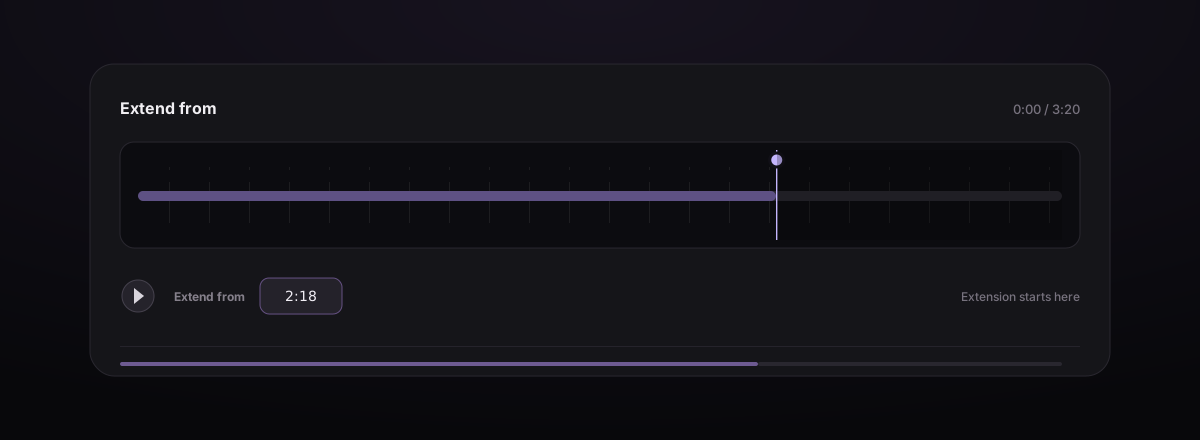
Everything before the marker stays. The original music after the marker may be replaced, so first decide where you want the new part to begin.
- Place it near the end to keep most of the original song.
- Move it earlier to replace an ending you do not like.
- Try placing it after a lyric line, group of beats, or sound that fades naturally.
- Do not cut through a word, held note, or strong drum beat.
Listen to a few seconds before and after the marker. Check that new music can start there without sounding sudden.
Write only what comes next
Continuation Lyrics should begin with the next intended section. Repeat a chorus in full when you want it sung again.
[Bridge]
All the windows hold the dawn
We keep moving, carrying on

[Final Chorus]
Carry me home through the blue
Every road still leads to you

[Outro]
Every road still leads to you
Use Style to say what should stay the same, then explain how the new ending should change:
same indie-pop style and lead singer,
slower drums in the bridge, full drums returning for the final chorus,
short clear ending with no fade
If you only want to add an ending, do not suddenly ask for a completely different music style.
Common extension recipes
Give a song a stronger ending
Move the marker just after the last complete chorus or lyric line, then add a short Final Chorus and Outro. Write no fade in Style if you want the music to stop clearly.
Turn an intro into a complete song
Use a melody, loop, or uploaded demo as the source. Start Extend after the intro, then add the first Verse, Chorus, and a similar Style. See Upload Audio & Choose an Action for upload limits.
Replace an unsatisfying last section
Move the marker before the problem begins. The old music after the marker may be replaced, so list the final sections you want in Lyrics and Style.
More examples to try
| Goal | Put the marker | Lyrics or setting |
|---|---|---|
| Sing the chorus again after the bridge | After the bridge | Add the complete Final Chorus and keep the same singer and instruments in Style |
| Replace an ending that stops too suddenly | Before the sudden ending | Add an Outro and write “slow down and end clearly, no fade” in Style |
| Turn an instrumental loop into a longer track | After the loop | Turn on Instrumental and write “bring in bass and drums gradually” in Style |
Reuse inputs for a fresh version
Open More actions on a completed song and choose:
- Reuse description for an Easy song;
- Reuse lyrics & style for a Custom song.
The creator reloads the saved form. Edit it, confirm the model and Title, and create again. Reuse starts a new song from the beginning, so it is useful for changing several parts or comparing styles. It does not keep a specific join from the old audio.
Give each variation a recognizable Title, and change one main variable at a time. For example, keep the lyrics and model fixed while comparing “acoustic trio” with “dream-pop band.”
Switch to another source action
The action button on the song card can switch among available actions without returning to the song list.
| Action | Best use |
|---|---|
| Cover | Keep the main features of the original song but change its style |
| Extend | Continue or replace the ending from a chosen point |
| Edit song section | Correct one short part, then return to the original song |
| Add Instruments | Build backing music around a voice recording |
| Add Vocals | Add sung vocals to an instrumental source |
Some songs also show Voice Changer in the Remix menu, which opens a separate tool. If an action is unavailable, the current song cannot use it right now.
Review the continuation
When processing completes, listen through the marker and the full ending. Check:
- rhythm, general pitch, room sound, and volume where the two parts meet;
- lyric order and whether repeated sections are complete;
- whether the continuation starts too early or repeats existing content;
- whether the final structure and total length fit the goal;
- whether the ending resolves cleanly.
Keep the source until the new version is approved. You can download, organize, share, or reuse the completed extension from More actions.
Fix common extension problems
| Problem | What to try |
|---|---|
| Extend is disabled | Try a completed song that plays normally and shows Extend as available |
| Create remains disabled | Move the marker inside the song and complete Title, Style, and required Lyrics |
| The new part starts suddenly | Move the marker after a lyric line or group of beats, and make Style closer to the original song |
| Old ending remains too long | Move the marker earlier, before the unwanted material |
| Continuation repeats the whole song | Enter only the next sections, not the full original lyric |
| Song ends unfinished again | Add a clear Final Chorus or Outro and ask for a clear ending |
| Reference disappears | The selected model or action cannot use Reference; switch back to supported settings and select it again |
For a correction that should return to the original song after the edit, use Replace a Song Section.
