Choose a Music Model
The model changes what you need to enter, how long the song can be, how many results you receive, and how Credits are calculated.
For your first song, keep the default V7. Change the model only when another option clearly matches the result you need.
Choose in a few seconds
| What you want | A good starting choice | Why |
|---|---|---|
| A complete song from a short description | V7 + Easy | The simplest general workflow; normally gives you two versions |
| A song using your exact lyrics | V7 + Custom | Keeps the familiar AIMusicGen workflow and supports detailed style control |
| One song with exact lyrics and a chosen length | MiniMax Music 3.0 | The duration is selected directly and the price follows the number of seconds |
| One prompt-driven song up to 10 minutes | ElevenLabs Music V2 → Prompt | Uses one complete description and a chosen duration |
| A song planned as timed sections | ElevenLabs Music V2 → Sections | Lets you describe 1–30 sections and set a duration for each |
| A Cover, Extend, or another edit of an existing song | Start from More actions on that song | The product shows only compatible actions and model choices |
This table is a starting point, not a quality ranking. A more expensive or more specialized model is not automatically better for every song.
Where to change the model
Open the AI Music Generator. The model button is beside Easy / Custom at the top of the creator.
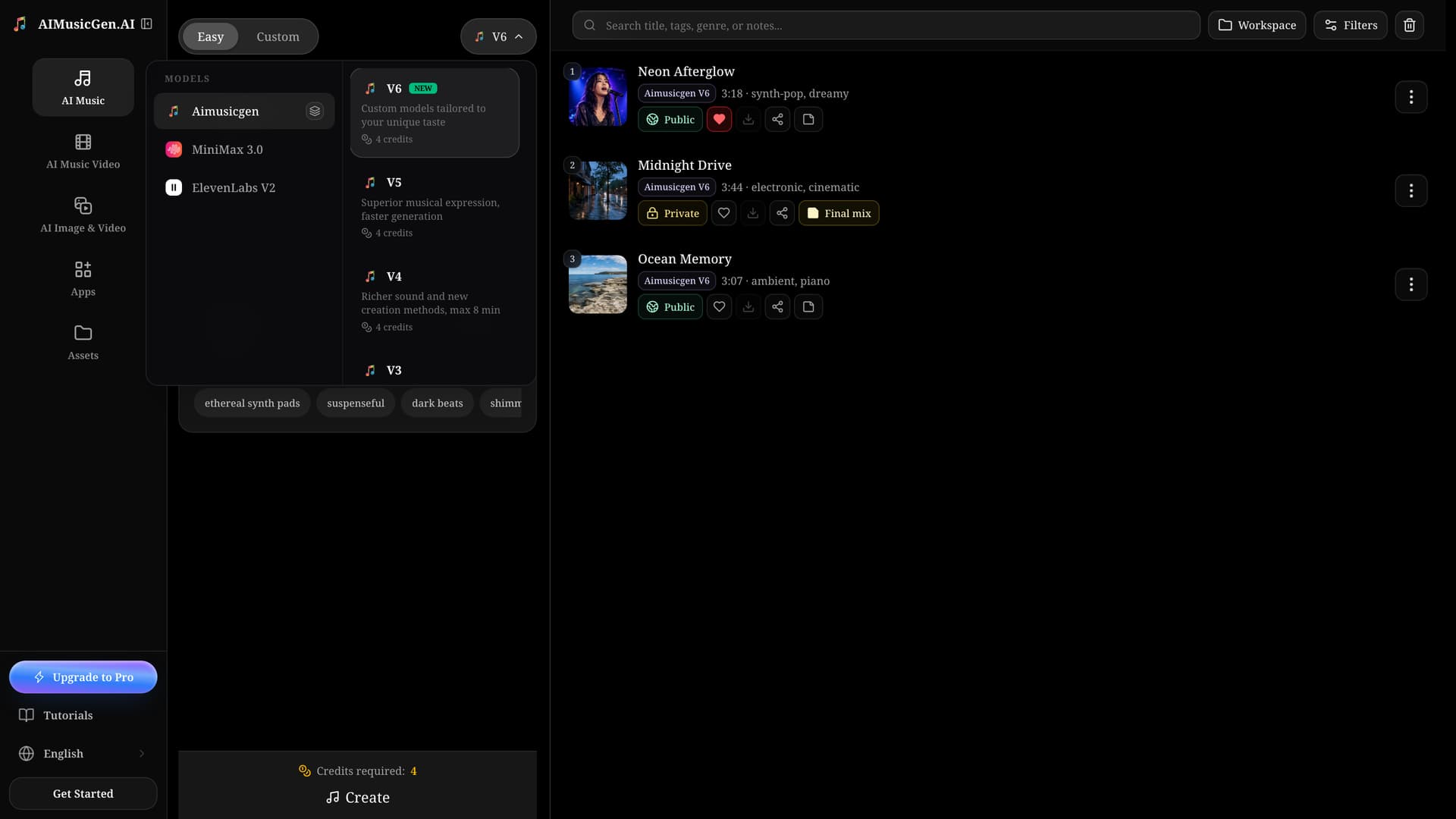
After changing models, look at the form again. Fields can appear, disappear, or become required because the models accept different inputs. Always read Credits required after your final model and duration choice.
Compare the current models
| Model | Best used when | Cost for one new-song request | Results |
|---|---|---|---|
| AIMusicGen V7 | You want the default general-purpose workflow | 4 Credits | 2 songs |
| AIMusicGen V6 | You specifically prefer its musical expression or generation behavior | 4 Credits | 2 songs |
| AIMusicGen V5 | You need an AIMusicGen workflow with songs up to 8 minutes | 4 Credits | 2 songs |
| AIMusicGen V4 | You want its prompt behavior and songs up to 8 minutes | 4 Credits | 2 songs |
| AIMusicGen V3 | You want its prompt behavior and songs up to 8 minutes | 4 Credits | 2 songs |
| AIMusicGen V2 | You prefer this earlier vocal model and need no more than 4 minutes | 4 Credits | 2 songs |
| MiniMax Music 3.0 | You have lyrics and want one song with a selected 1–300 second length | 1 Credit per second | 1 song |
| ElevenLabs Music V2 | You want one 3–600 second song from a full prompt or timed sections | 10 Credits per started minute | 1 song |
For ElevenLabs, billing rounds up to the next started minute. A 60-second song costs 10 Credits; a 61-second song costs 20 Credits. The cost shown in the creator is the number to check before submitting.
AIMusicGen V2–V7
Choose an AIMusicGen model when you want the broadest path through the music creator.
You can use Easy for one song description or Custom for your own lyrics and style. AIMusicGen models also support most audio-based and existing-song workflows, including compatible Covers, Extensions, section replacement, added instruments, and added vocals.
A new-song request normally returns two alternatives. That is useful when you want to compare different melodies or arrangements without submitting the same idea twice.
The practical differences between V2–V7 are the model generation behavior and supported source-audio length. V2 accepts source audio up to 4 minutes; V3–V7 accept up to 8 minutes. If you have no version-specific reason to choose an earlier model, start with V7.
MiniMax Music 3.0
Choose MiniMax when all of these are true:
- You have lyrics ready.
- You want one result rather than two alternatives.
- You want to select a length from 1 to 300 seconds.
- Per-second pricing fits your plan.
MiniMax works in Custom only and requires lyrics. It does not create Instrumental music and does not use song or voice References.
A separate MiniMax Cover choice is available from a completed song. That action has its own 20-Credit cost, so check the label before creating.
ElevenLabs Music V2
Choose ElevenLabs when you want one song with a specified duration from 3 to 600 seconds.
- Use Prompt when one complete description can explain the whole song.
- Use Sections when different parts need different instructions or timing. You can add 1–30 sections, each lasting 3–120 seconds, with a combined maximum of 600 seconds.
ElevenLabs Music V2 does not use References, Audio uploads, or the existing-song editing actions. If those are important to your workflow, use a compatible AIMusicGen model instead.
When you start from an existing song
Do not choose a model from an empty creator first. Open More actions on the completed song and select the result you want:
- Cover lets you choose a compatible original model or MiniMax.
- Extend and Edit song section keep the original song model.
- Add Instruments and Add Vocals use V5, V6, or V7; the creator changes to V7 when needed.
This route reduces guesswork because the creator loads the source song and the settings that belong to that action.
Related guides
- Creating a song for the first time? Follow the Quickstart.
- Unsure whether to use Easy, Custom, an upload, or an existing song? Read Choose a Creation Mode.
- Need the exact cost and task behavior? Read How Credits & Tasks Work.
